ChatGPT Lockdown Mode: OpenAI's New Defense Against Prompt Injection
TL;DR
OpenAI rolled out Lockdown Mode on June 6, letting users toggle off live web access, Agent Mode, and Deep Research to limit prompt injection exfiltration risks. Available to all accounts, free tier included — but it has one fundamental limitation worth understanding.
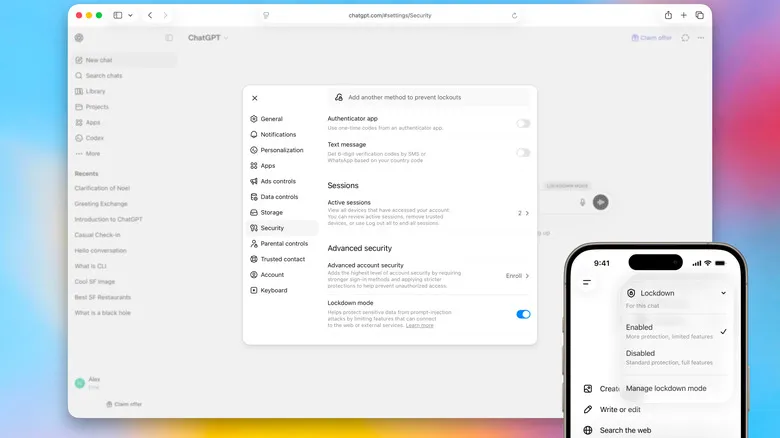
OpenAI rolled out Lockdown Mode on June 6, 2026, giving every ChatGPT account an explicit toggle to restrict the AI’s outbound network access. The feature targets prompt injection — an attack method that has grown from a theoretical concern into a documented threat as AI tools become embedded in enterprise workflows.
The mechanics are straightforward. Attackers embed malicious instructions inside webpages, PDFs, or email content. When ChatGPT reads that material during browsing or summarization, it may follow those hidden instructions — transmitting conversation history to an external server, or redirecting users to a phishing URL. Dozens of documented cases have emerged since 2023, and the rollout of Agent Mode and Deep Research has meaningfully expanded the attack surface.
What Lockdown Mode Actually Disables
When enabled, ChatGPT operates with minimal external network connectivity.
Live web browsing is turned off, replaced with cached content only. ChatGPT stops sending new HTTP requests, which cuts off the channel attackers use to exfiltrate data through browsing sessions. Deep Research and Agent Mode are disabled — both require frequent external service connections and have been the most commonly exploited entry points in documented attacks. Web images no longer load. File downloads are blocked, though users can still manually upload documents.
Activation: Settings → Safety and security → Advanced security → Lockdown mode toggle. Available on all account types, including the free tier.
The same update introduced Elevated Risk Labels, which appear when ChatGPT detects sensitive material in a conversation and prompts users to proceed carefully.
The Fundamental Limitation
OpenAI’s announcement states this directly: Lockdown Mode cannot prevent malicious prompts from being processed by ChatGPT. Upload a PDF with embedded attack instructions, and ChatGPT will still read and potentially act on those instructions.
What the mode does is close the data’s exit routes. Even if an injected instruction executes, there are no active network channels to send stolen data through. Blocking injection at the input level is technically difficult — language models are built to understand and act on natural language instructions. Locking down the output channels is the practical alternative, and OpenAI has chosen that path deliberately.
Engadget’s coverage notes that for most organizations, the primary risk is data exfiltration rather than unexpected instruction-following behavior. Lockdown Mode addresses the higher-priority problem.
Active Session Manager
The same update added an Active Session Manager: a view of all devices currently logged into your ChatGPT account, with the ability to remotely terminate any session.
Google and Apple have offered this for years. For organizations running shared ChatGPT Business accounts, unauthorized account sharing or credential theft is a more frequent security failure than prompt injection. Session Manager handles that problem directly.
Who Should Turn It On
OpenAI’s stated target: “people and organizations that handle sensitive data.” The practical read: lawyers reviewing case files in ChatGPT, healthcare administrators summarizing patient records, analysts drafting financial reports. Any workflow where the underlying data carries real confidentiality weight.
For general users, the calculation is different. If your typical usage is drafting emails or answering questions, the disabled features aren’t ones you rely on heavily, and your exposure to prompt injection is relatively low.
OpenAI’s decision to make this an opt-in toggle rather than a default setting is correct. Users who need the protection get it. Users who don’t keep their functionality intact. Security design is always a trade-off, and this one is drawn in the right place.
If this was useful, subscribe to the newsletter for weekly AI PM insights and GenAI case studies.
Related Articles
OpenAI Launches ChatGPT for Teens: Default Safeguards Still Lack Outcome Data
OpenAI adds content limits, guided study, and parental controls for users aged 13 to 17, while age assurance, long-term memory, and real-world safety outcomes remain unresolved.
OpenAI Launches Dots: Ongoing Work Should Not Become a Growing Review Queue
OpenAI is rolling out dots to eligible paid users for work that continues between conversations. Read-only background research and limited memory controls make missed commitments and accumulated review work more useful tests than activity alone.